인터랙션 & 컴포넌트/CSS
[인터랙션 CSS] 햄버거 메뉴 만들기
millfeel1298
2021. 2. 17. 18:22
See the Pen [인터랙션 CSS] 햄버거 메뉴 만들기 by mill (@millfeel) on CodePen.
접근성 이슈
<div class="wrap" tabindex="0" role="navigation" aria-label="mobile menu">
</div>
tab 사용시 포커스 되지 않는 이슈를 해결하기 위해서 "tabindex"를 사용해야 하고, role과 aria-label을 선언하여 해당 ‘div’ 영역에 대한 설명을 제공해야한다.
label의 기본 속성은 포커스가 되지 않는다.
<div class="wrap" tabindex="0" role="navigation" aria-label="mobile menu">
  <input type="checkbox" id='menuicon'>
  <label for="menuicon">
    <span></span>
    <span></span>
    <span></span>
  </label>
</div>
input[id='menuicon'] {display: none;}
input[id='menuicon'] + label {
position: relative;
display: block;
width: 60px;
height: 40px;
cursor: pointer; /* 포인터가 label에 설정돼 있다. */
background-color: #ddd;
}
input[id='menuicon'] + label span {
position: absolute;
display: block;
width: 100%;
height: 5px;
border-radius: 30px;
background-color: #000;
transition: .35s;
}
input[id='menuicon'] + label span:nth-child(1) {top: 0;}
input[id='menuicon'] + label span:nth-child(2) {top: 50%; transform: translateY(-50%);}
input[id='menuicon'] + label span:nth-child(3) {bottom: 0%;}
input[id='menuicon']:checked + label span:nth-child(1) {top: 50%; transform: translateY(-50%) rotate(45deg);}
input[id='menuicon']:checked + label span:nth-child(2) {opacity: 0;}
input[id='menuicon']:checked + label span:nth-child(3) {bottom: 50%; transform: translateY(50%) rotate(-45deg);}Q. .wrap(감싸는 박스)가 아닌 label(자식)에 cursor을 사용한 것일까?
.wrap에 포인터가 되지 않았다.
.wrap {
  cursor: pointer; /* 포인터 설정을 .wrap에 적용  */
}
input[id='menuicon'] {display: none;}
input[id='menuicon'] + label {
  position: relative;
  display: block;
  width: 60px;
  height: 40px;
  /* label에 있던 포인터 설정 삭제 */
  background-color: #ddd;
}
[원인]
<label>은 기본 속성인 cursor가 default(커서를 올려도 아무 효과가 없음)이기 때문이다.
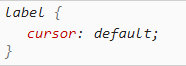
.wrap는 별도의 크기를 가지지 않고, 자식인 label의 크기만을 가지고 있기 때문에 .wrap에 설정을 해도 적용이 안되는 것처럼 보이는 것이다.
[공부 좌표]